


Survey scripting is the process of coding a questionnaire’s logic, validation, and export mapping into a working instrument, and it has to be treated as software or it will produce bad data. That means planning before you touch a platform, programming with generic and documented logic, and testing in stages before code-freeze. DIMEWiki, the NCHS RSS-3 programming specifications, and firms like Veridata Insights all converge on the same point: sloppy scripting is the single biggest preventable source of ruined datasets.
TL;DR:
- Proper planning, variable naming, and documenting skip logic are essential to prevent major scripting errors that can ruin datasets.
- Avoid hard-coded answer positions, use explicit skip criteria, and standardize answer scales to make scripts more robust and easier to update.
- Rigorous testing at each stage, including static analysis and live device checks, catches different classes of bugs before survey deployment.
- Keep detailed change logs, version control every modification, and clearly list all variables and logic in documentation to maintain data integrity over time.
- Teams should consider expert programming support for complex surveys, multi-wave trackers, or high-stakes data collection to avoid costly errors.
Table of Contents
- What Is Survey Scripting? The Three Stages That Actually Matter
- A Best-Practices Checklist for Scripts That Don’t Break
- Building Blocks: Variable Types, IDs, and Reusable Patterns
- Testing and QA: The Order That Catches the Most Bugs
- Documentation and Version Control Keep Your Data Usable
- Choosing a Scripting Platform or Framework
- When It’s Time to Bring in Expert Programmers
- Get a Spec Review From Veridata Insights
- Sources
What Is Survey Scripting? The Three Stages That Actually Matter
Survey scripting breaks into three overlapping stages: planning, programming, and testing. Skipping or rushing any one of them is how skip logic breaks in wave three of a tracker, or how a numeric field accepts “banana” as a valid answer.
Planning comes first, and it produces artifacts, not just conversations. Before scripting starts, the team should have a finalized questionnaire, a skip pattern map, plain-language logic specs, and a variable list with assigned names. The DIMEWiki guidance on questionnaire programming frames this as an iterative process rather than a one-time handoff, and that iteration starts here, on paper, before it starts in code.
Programming is where the spec becomes a working survey. This stage covers implementing variable names exactly as documented, building answer scales, wiring skip logic between questions, setting constraints on numeric and text fields, and tagging export flags so the right fields land in the final dataset. Effective programming avoids hard-coded question positions or answer counts to prevent scripts from breaking when responses change.
Testing closes the loop. It includes unit checks on individual questions, walkthroughs on the actual devices or browsers enumerators and respondents will use, and a pilot run with real or realistic respondents. Testing also forces a decision every team needs to make on purpose rather than by accident: when does the script freeze? A code-freeze window, held before final testing begins, keeps last-minute “quick fixes” from introducing new bugs nobody has time to catch. The Abdul Latif Jameel Poverty Action Lab’s survey programming guidance treats this staging as essential precisely because surveys serve three different audiences at once: surveyors, respondents, and analysts, each of whom breaks the instrument in a different way if it isn’t tested for them specifically.
A Best-Practices Checklist for Scripts That Don’t Break
Most scripting disasters trace back to a handful of repeatable mistakes. Here’s the checklist that catches them before they reach the field.
- Use unique, descriptive variable names, never platform defaults. A variable called
q14tells an analyst nothing six months later;hh_income_bracketdoes. The DIMEWiki page on variable names makes this a first-order rule, and for tracker studies, lock those codes once wave one launches so wave three doesn’t quietly relabel the same concept. - Avoid hard-coded indexes. If your skip logic says “route based on the third answer chosen,” it breaks the moment someone reorders the answer list. Use functions or answer-count logic instead of fixed positions to make scripts more robust and intent-revealing.
- Define skip logic and universes explicitly, and document them. Every question needs a stated universe: who sees it, and who is legitimately skipped. Legitimate skips need their own reserved codes, distinct from refusals or “don’t know,” a distinction the NCHS RSS-3 programming specifications require explicitly.
- Standardize your answer scales. Decide up front whether a scale is balanced (equal positive and negative options around a neutral midpoint) or unbalanced, document the anchor labels, and reuse the same scale object across questions instead of rebuilding it each time.
- Use dummy or hidden questions for calculations and state tracking. These invisible questions can hold running totals, flag prior answers, or store values used in later expression fields. They’re common, useful, and easy to forget when you’re documenting the script, so log them anyway.
- Set both hard and soft constraints, with sensible outs. A hard constraint might block a numeric field outside 0 to 120 for age; a soft constraint might warn but allow an unusual value through. For sensitive items, income and health status especially, allow a “prefer not to answer” out, and write error messages that tell the respondent exactly what to fix.
- Freeze the code before final testing, and log every change. A formal code-freeze window matters more in complex, multi-branch surveys than anywhere else. Without one, iterative edits made during testing frequently reintroduce versioning errors and quietly break skip logic that had already passed review.
Pro Tip: Keep a running change log from day one, even during early drafts. When a client asks “why did the skip pattern change between version 3 and version 5,” you want an answer in seconds, not an afternoon of digging through old files.
The common thread across all seven items is the same insight practitioners keep repeating: most serious scripting bugs come from a lack of logical organization, not from typos. Pseudo-code up front, and generic rather than hard-coded logic, fixes more problems than any amount of debugging after the fact.
Building Blocks: Variable Types, IDs, and Reusable Patterns
Every survey script is built from a small set of recurring parts, and knowing when to use each one is most of what separates a clean script from a fragile one.
Variable types need to match the question, not just the answer format. Single-response questions get one variable; multi-check questions need either a variable per option or a delimited multi-select field, depending on the platform. Numeric and open text fields need explicit length or range limits set at programming time, not discovered later. Grid questions, where several sub-items share a scale, deserve their own naming convention so each cell exports as a distinct, identifiable column.
Short IDs versus exported variable names solve two different problems. A short internal ID like Q14 helps programmers navigate a long script quickly, while the exported name, hh_income_bracket, is what analysts see in the dataset. Keep both, and keep a mapping table between them so nobody has to reverse-engineer which is which.
Common reusable patterns worth building once and reusing:
- Shared answer scale objects, defined a single time and referenced everywhere a 5-point satisfaction scale or similar appears, so a wording tweak updates every instance at once instead of forty separate ones.
- Filtering functions instead of hard-coded lists. Patterns like filtering answers by prior answers, or counting how many options a respondent selected, let logic adapt automatically when answer lists change. Platform support documentation, including SurveyToGo’s scripting best practices, catalogs these filtering and answer-count patterns as standard constructs worth having on hand regardless of platform.
- Hidden or dummy questions for expression fields, used to calculate running scores, store branching flags, or hold values pulled from an earlier answer. Order matters here: an expression field that references a later question will simply fail, so map dependencies before you build them.
Testing and QA: The Order That Catches the Most Bugs
Run these checks in sequence rather than all at once, because each stage catches a different class of error and later stages waste time if earlier ones are skipped.
- Static analysis first. Check for unreachable questions, duplicate question IDs, and forward branches that skip over required logic. SurveyMan’s research on automated survey debugging treats this static pass as the cheapest bug-catching step available, since it needs no live respondents at all.
- Unit and edge-case testing. Test every constraint at its boundary: the minimum and maximum of a numeric range, an empty text field, a “select all that apply” question with zero or every option chosen, and every legitimate skip path.
- Enumerator and device testing. Walk through the live script on the actual tablets, phones, or browsers the field team will use, and verify every translated version renders and routes identically to the source language.
- Pilot deployment with dynamic checks. A small live pilot, paired with the kind of automated inattentiveness detection SurveyMan demonstrates, surfaces respondents clicking through without reading, a pattern static analysis alone can’t catch.
- Post-launch monitoring. Run high-frequency checks in the first days of full fielding, watching completion times and skip patterns for anything that looks wrong at scale.
Pro Tip: If you find a bug after launch, patch it, but log the exact date, field, and fix in your change log before you touch the live script again. A silent patch is how two versions of “the same” dataset end up with different variable meanings.
Documentation and Version Control Keep Your Data Usable
A programming specification should list every variable’s type, its export code, its skip logic and universe, its error messages, and where page breaks fall. That document is what an analyst reads six months later when a number looks strange, and it should match what’s actually in the script.
Version control matters as much for questionnaires as for code. Decide in advance when a change warrants a new numbered version versus a quiet edit in place, and log the difference every time, a discipline the DIMEWiki process treats as core to the whole scripting workflow rather than an afterthought.

Before export, decide which fields analysts actually need. Dummy questions and calculation helpers built for internal logic usually should not leave the script, so mark them non-exportable and keep a short surveyor manual mapping export codes to their meaning.
Choosing a Scripting Platform or Framework
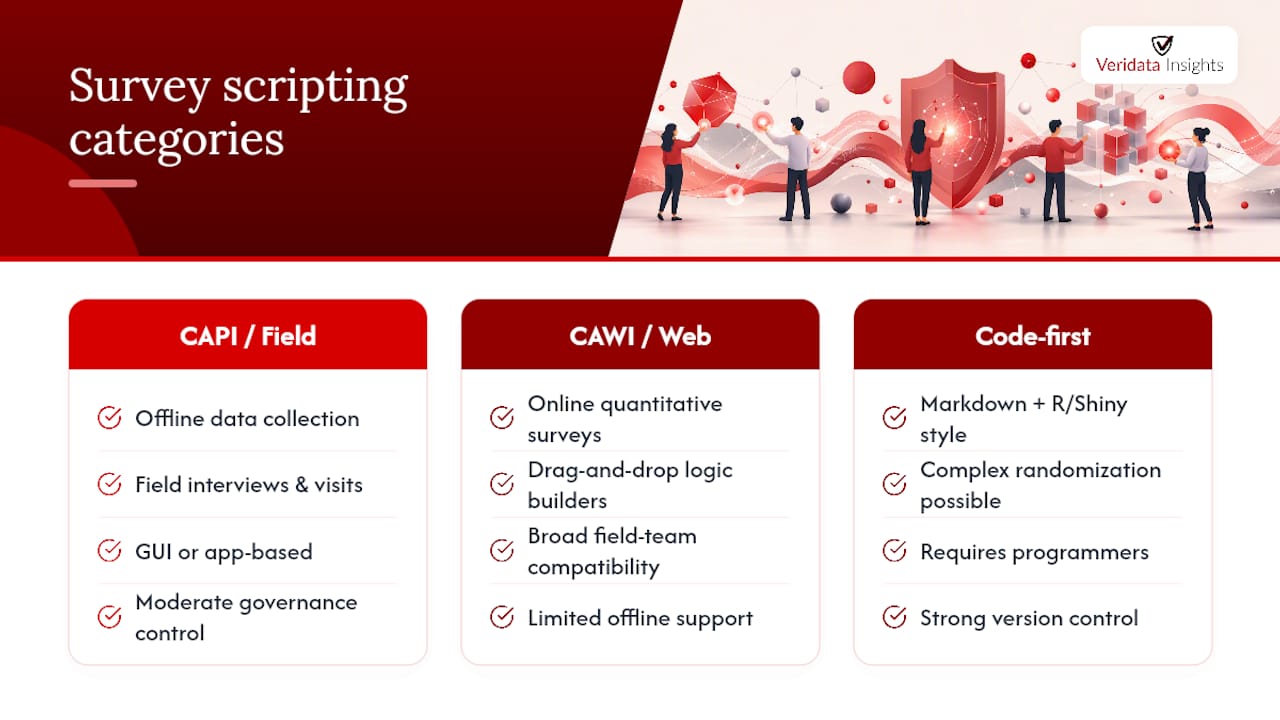
Survey scripting tools fall into a few broad categories, and the right one depends on your team’s skills and your data governance needs more than any feature checklist. CAPI and field apps handle offline data collection well. CAWI and web survey platforms cover most online quantitative work with drag-and-drop logic builders. Code-first, reproducible frameworks, like the markdown-and-R/Shiny approach demonstrated by surveydown, give teams full version control and programmatic reproducibility for complex randomization, at the cost of needing programmers comfortable with code rather than a GUI.
The trade-off is consistent across categories: GUI platforms are faster to learn and deploy, while code-first frameworks give you more control over hosting, data governance, and exact reproducibility of complex logic. Teams with in-house programming skills and strict data control requirements lean toward code-first tools; teams that need speed and broad field-team compatibility usually lean toward established GUI platforms instead.
When It’s Time to Bring in Expert Programmers
Complex branching, healthcare and regulatory studies, multi-wave trackers, and hard-to-reach audiences are exactly where scripting mistakes get expensive fast. Veridata Insights handles the full arc: consultation and questionnaire review, programming, testing, hosting, and clean data export, backed by documented programming specifications and version-controlled change logs. A managed programming and consultation engagement for a medical company shows what that looks like in a regulated, high-stakes context where a single skip-logic error can invalidate a wave of data.
Get a Spec Review From Veridata Insights
If your questionnaire has more branching than your last script handled cleanly, or you’re staring down a tracker that needs locked codes across five waves, that’s exactly the kind of project where an outside spec review pays for itself. Some service providers offer flexible scheduling and do not require project minimums, whether clients need a full programming build or just a second set of eyes on their logic before code-freeze. Some firms run consultation, programming, data collection, and reporting under one roof to avoid handoffs between separate vendors. Reach out through the Veridata Insights contact page to request a quote or a spec review on your next questionnaire, and learn more about how the full survey programming service fits into a broader research project.
Sources
- Questionnaire Programming | Dime Wiki
- Questionnaire Programming Specifications RSS-3
- SurveyMan: A system for designing, deploying, and automatically debugging surveys (preprint)
- Survey programming | The Abdul Latif Jameel Poverty Action Lab