

TL;DR:
- A strong data workflow requires regular audits, clear documentation, and automation to ensure data quality and consistency.
- Using the right tools, establishing governance, and aligning metrics across teams improve decision accuracy and client trust.
- Continuous verification, measuring impact, and pilot testing new approaches foster sustainable workflow improvements.
Imagine your team delivers a major client report, only to discover two data sources were never reconciled and a key segment was excluded entirely. The client is unhappy. The re-work costs real money. And the trust you spent months building takes a hit. This scenario plays out more often than agency leaders care to admit. Poor data quality costs organizations an average of $12.9 million per year, and 67% of teams report it directly impacts their decisions. A well-structured data analysis workflow is not optional. It is the backbone of every strong client outcome your agency delivers.
Table of Contents
- Assessing your current data analysis workflow
- Essential tools and requirements for agencies
- Executing an integrated data analysis workflow
- Verifying, troubleshooting, and measuring impact
- What most agency leaders get wrong about data workflows
- Level up your agency’s data analysis workflow with expert support
- Frequently asked questions
Key Takeaways
| Point | Details |
|---|---|
| Audit before change | Start with a detailed workflow audit tied to business questions for meaningful improvements. |
| Automate wisely | Use automation for repetitive tasks but keep expert oversight for important decisions. |
| Integrate and standardize | Unify sources and standardize metrics to reduce errors, costs, and compliance issues. |
| Measure what matters | Track both ROI and decision speed as proof that your workflow is delivering real client value. |
| Prioritize privacy and governance | Embed privacy protections and compliance within every step of your data analysis workflow. |
Assessing your current data analysis workflow
With the impact clear, let’s begin with a thorough workflow audit to ensure foundational readiness.
Before you can fix a broken process, you need to see it clearly. Most agencies assume their workflow is functional because data is moving and reports are going out. But moving data is not the same as reliable data. Start by mapping every point where information enters your system, including survey platforms, CRM exports, third-party panels, ad platforms, and client-provided spreadsheets. Then trace how that data moves through cleaning, transformation, analysis, and delivery.
Ask yourself these audit questions:
- Where does your data originate, and are those sources documented?
- What integrations exist between platforms, and are they monitored for errors?
- Where do handoffs happen between team members or departments?
- Are there known quality gaps or recurring data complaints from clients?
- Do compliance checks happen at every stage, or only at the end?
Once you have that map, you can begin identifying silos. A silo is any place where data sits isolated from the rest of your workflow, accessible only to one team or platform. Silos slow decisions and introduce inconsistency. They are one of the most common culprits behind mismatched client reports.
Here is a simple framework to evaluate your workflow health:
| Workflow dimension | Healthy signal | Warning sign |
|---|---|---|
| Data sourcing | Documented, consistent sources | Ad hoc, manual pulls |
| Integration monitoring | Automated alerts for failures | Discovered by accident |
| Quality checks | Built into each stage | Only at reporting |
| Compliance review | Ongoing, embedded | Done once before delivery |
| Decision speed | Days | Weeks |
The most important thing to remember: start with business questions, not the data itself. Too many agencies build workflows around what data they have rather than what decisions that data needs to support. When you anchor every workflow step to a client business question, you eliminate a lot of unnecessary complexity fast.
Pro Tip: Schedule a quarterly workflow audit with a cross-functional team. Include someone from analytics, someone from client services, and someone from data operations. Each perspective reveals different failure points.
Strong agency best practices include documenting every integration point so that when something breaks, you know where to look first. And if your firm runs projects at different scales, investing in scalable research approaches ensures your workflow holds up whether you’re running a 100-respondent pilot or a 10,000-respondent national study.
Essential tools and requirements for agencies
Now that you’ve mapped your current state, see what tools and resources you need for next-level performance.

Having the right tools does not guarantee a great workflow, but having the wrong ones will definitely break it. Agencies typically need four categories of technology: data extraction and transformation (ETL), visualization, compliance management, and team collaboration. The challenge is choosing tools that communicate well with each other and fit your team’s actual skill level.
Here is a practical comparison of common agency tool categories:
| Tool category | Examples | Primary benefit | Common limitation |
|---|---|---|---|
| ETL and data prep | Fivetran, dbt, Alteryx | Automates data movement | Requires technical setup |
| Visualization | Tableau, Power BI, Looker | Communicates insights visually | Can mislead without data quality |
| Compliance and governance | OneTrust, DataGrail | Manages consent and privacy | Needs ongoing policy updates |
| Collaboration | Confluence, Notion, Slack | Keeps teams aligned | Not a substitute for process |
Beyond technology, agencies need organizational structure. A cross-functional metric council, even an informal one, can prevent the costly problem of different teams reporting different numbers to the same client. When your analytics team defines “conversion” one way and your client success team defines it another way, you create confusion that erodes trust. Standardize your metric definitions in writing, and make sure everyone uses the same glossary.
Skill requirements matter too. A well-rounded agency data team needs people who can:
- Design and execute quantitative and qualitative research methodologies
- Build and maintain data pipelines
- Apply statistical analysis and interpret nuanced results
- Communicate findings clearly to non-technical clients
- Understand privacy regulations and compliance requirements
Mitigating risks like poor data quality, data silos, and privacy vulnerabilities requires a combination of audits, automation, and governance. You cannot rely on talent alone. The systems around your team need to support consistent, defensible output.
Following solid data quality strategies keeps your insights clean from collection through reporting. Pair that with robust fraud prevention measures to protect the integrity of every data point you collect, especially in online panel research where response fraud is a real and growing concern. Reviewing data protection workflow best practices also helps your agency stay ahead of evolving regulatory expectations.
Pro Tip: Automate your routine data cleaning tasks, things like deduplication, format standardization, and outlier flagging. This frees your senior analysts to focus on interpretation and strategy rather than housekeeping. Automation handles the predictable problems. Humans handle the judgment calls.
Executing an integrated data analysis workflow
With your toolkit in hand, apply these steps to build a seamless, repeatable analysis cycle.
Knowing what you need and building it are two different things. Here is how to put the pieces together into a workflow that actually runs well under real agency conditions.
- Unify your data sources. Pull all relevant data into a single environment before any analysis begins. This could be a cloud data warehouse, a research platform, or a well-structured shared drive. The key is that everyone works from the same version of the truth, not separate exports.
- Clean and transform the data. Apply your standardized cleaning rules. Flag anomalies, remove duplicates, reconcile format differences, and validate against your source documentation. This step should be largely automated, but a human review of flagged issues is essential.
- Analyze with the business question in mind. Run your statistical models, cross-tabulations, or qualitative coding against the specific client question you identified at the start. Avoid the temptation to report everything you find. Relevant findings first, additional detail second.
- Visualize for the audience. Your internal team may want detailed tables. Your client may want a single chart that shows a clear trend. Build both, and know when to use which. Good visualization does not just display data. It makes a decision easier.
- Report with narrative. Data without context is noise. Every report should open with the core finding, explain what it means for the client’s business, and recommend a clear next action. Do not make the client do the interpretive work.
- Archive and document. Every project should leave behind clean documentation of what data was used, how it was processed, and what decisions were made. This protects your agency and makes future projects faster.
Agency leaders who unify sources, automate transformation, and build governance for scalability and compliance are the ones who consistently deliver better client outcomes. It is not magic. It is discipline applied consistently.
Embedding privacy and fraud checks throughout the workflow, not just at the end, is critical. AI and analytics integration can accelerate anomaly detection and pattern recognition across large datasets. But make sure your data governance frameworks are in place before you scale AI use. Governance ensures that speed does not come at the cost of accuracy or accountability.
A note on automation: Automate what is predictable. Reserve human judgment for what is nuanced. The best workflows are not fully automated or fully manual. They are hybrid, and the handoffs between machine and human are clearly defined.
Pro Tip: Pilot advanced analytics features on one high-value client engagement before rolling them out firm-wide. This gives you real feedback on what works without putting every client relationship at risk during the learning curve.
Verifying, troubleshooting, and measuring impact
After execution, focus on ongoing verification and continuous improvement.
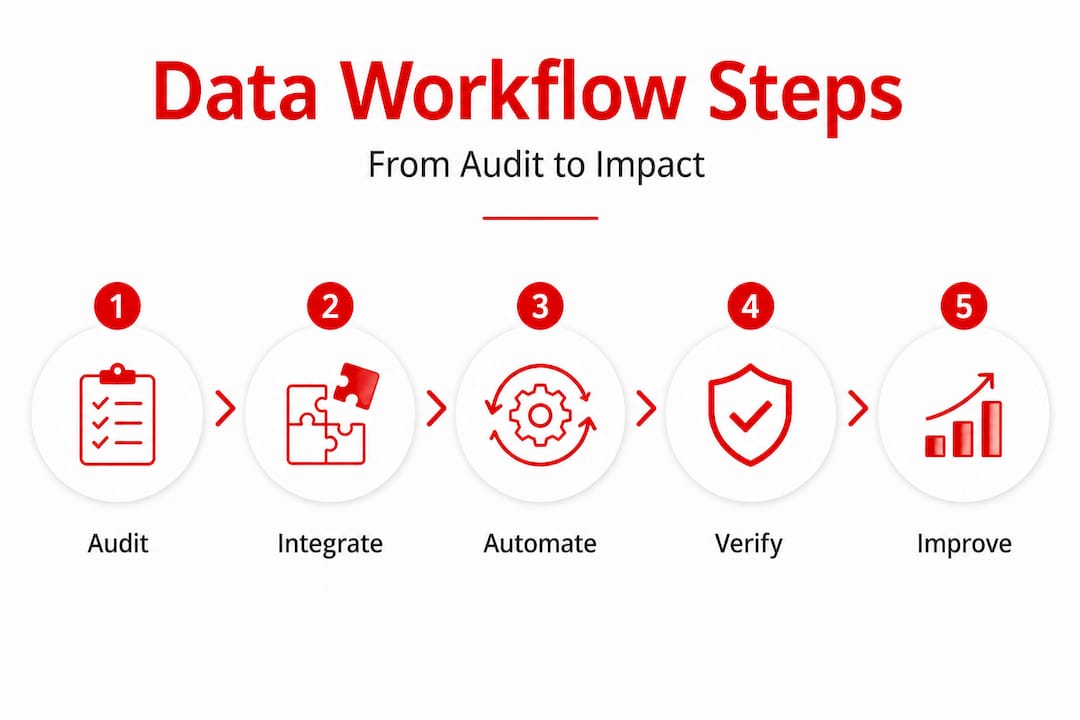
The workflow does not end when the report goes out. The most mature agencies build verification and improvement loops into every project cycle. This is where you catch problems early, measure real impact, and build the case for your agency’s value over time.
Key metrics to track across your workflow:
| Metric | What it measures | Target signal |
|---|---|---|
| Data accuracy rate | Percentage of clean, usable records | Above 95% |
| Decision speed | Time from data collection to client recommendation | Trending down |
| Stakeholder confidence | Client satisfaction with insight quality | Consistently high |
| ROAS and LTV:CAC | Return on ad spend and customer value ratios | LTV:CAC above 4:1 |
| Re-work rate | How often deliverables require correction | Trending toward zero |
Tracking ROI metrics like ROAS and LTV:CAC ratios, prioritizing multi-touch attribution, and valuing human review for high-stakes decisions are all signals of a mature, impact-focused agency workflow. These numbers tell you whether your process is actually driving client business outcomes, not just producing reports.
Common workflow bottlenecks to troubleshoot:
- Data silos: Two teams using different sources for the same metric. Fix by mandating a single source of truth per metric in your governance documentation.
- Volume overwhelm: So much data that the team spends all its time managing it instead of analyzing it. Fix with better ETL automation and clear data retention policies.
- Privacy failures: Client data handled inconsistently across projects. Fix by embedding data privacy standards into your intake and processing checklists.
- Skill gaps: Analysts who can run models but cannot explain findings to clients. Fix with structured communication training or by pairing technical analysts with client-facing strategists.
Remember: 67% of teams report that data quality directly impacts their agency decisions. If your workflow does not have a clear quality checkpoint at every stage, you are making decisions on shaky ground.
Use cross-platform attribution to get an accurate picture of which data inputs are actually driving outcomes. And when clients ask why your recommendations work, lean on the kind of data-driven consulting evidence that shows not just what happened but what caused it.
What most agency leaders get wrong about data workflows
Here is where we share a hard-earned perspective, and it might push back on what you’ve heard elsewhere.
The most common mistake we see agency leaders make is believing that better technology solves a process problem. A new BI tool will not fix a team that does not agree on metric definitions. A fancier dashboard will not help if the underlying data is inconsistent. Technology amplifies your process. If your process is weak, technology just makes the problems faster and more visible.
The second mistake is treating workflow improvement as a project rather than a practice. Agencies often do a big workflow overhaul, feel good about it, and then let things drift back to the old way within six months. Sustainable improvement comes from building small habits into every project cycle: always document your data sources, always start with the business question, always review for compliance before delivery.
Here is the contrarian truth we have seen play out over and over: most agencies have more data than they need and less clarity than they should. The answer is not more data collection. It is sharper question design at the start. When you know exactly what decision a client needs to make, you can often answer it with less data, collected more cleanly, analyzed more precisely.
AI-powered feedback tools are exciting, and we genuinely believe in them. But they work best when the humans using them have already done the disciplined work of defining good questions and clean processes. AI trained on messy inputs gives you messy outputs at scale.
Pilot your workflow changes on your highest-value problems. Not the easiest projects, not the lowest-risk engagements. Start where the stakes are real, because that is where you will learn fastest and prove impact most convincingly to your clients and your leadership team.
Level up your agency’s data analysis workflow with expert support
If you’ve read this far, you already know that a better data analysis workflow is not just about tools or technology. It is about asking the right questions, building the right process, and having the right partner when the work gets complex.
At Veridata Insights, we work with agencies, consulting firms, and market research teams to design and execute research workflows that are clean, defensible, and built around your client’s actual business questions. Whether you need help auditing your current process, building governance frameworks, designing a quantitative study, or integrating AI-enhanced analysis, we are ready to work with you at whatever scale you need. No project minimums. Seven days a week. Every step of the process, as much or as little as you need. Reach out and let’s talk about what a stronger workflow could mean for your next client engagement.
Frequently asked questions
What is the first step in improving data analysis workflow for agencies?
Start by auditing all current data sources, integrations, and quality checkpoints, then tie workflow improvements directly to core business and client questions. Good outcomes start with the right question, not the largest dataset.
How can agencies reduce errors and costs in data analysis?
Unify data sources, automate cleaning, standardize metrics across teams, and regularly review for privacy and compliance at every stage. Mitigating data silos and quality gaps through governance and automation consistently reduces both error rates and re-work costs.
Which metrics best measure a data workflow’s success?
Key metrics include ROI indicators like ROAS and LTV:CAC ratios, decision speed, re-work rate, and stakeholder confidence, not just raw data accuracy.
Should agencies use AI in all parts of their data analysis workflow?
AI is highly effective for automation, anomaly detection, and pattern recognition, but human input remains essential for strategic interpretation, high-stakes decisions, and any nuanced qualitative judgment calls.
Recommended
- Healthcare data analysis: 478% ROI for administrators
- Case Study: Data Processing & Visualization Solution For A Business Services Provider – Veridata Insights
- Data analysis step by step for market researchers in 2026 – Veridata Insights
- How Data and Analytics Are Transforming Strategic Consulting – Veridata Insights