

An effective email survey invite comes from a recognizable sender, an informative subject line, one sentence explaining why you’re asking, an honest time estimate, a single clear call to action, and a reminder sent 48 to 72 hours later. Get those six pieces right and response rates take care of themselves. When the stakes are high enough that you can’t afford to guess, a partner like Veridata Insights can build and run the whole thing for you.
TL;DR:
- Sending surveys on Mondays with reminders 48 to 72 hours later improves response rates, especially when personalized and tested beforehand.
- Using clear, informative subject lines that specify the sponsor and interaction, paired with a realistic time estimate, boosts open and completion rates.
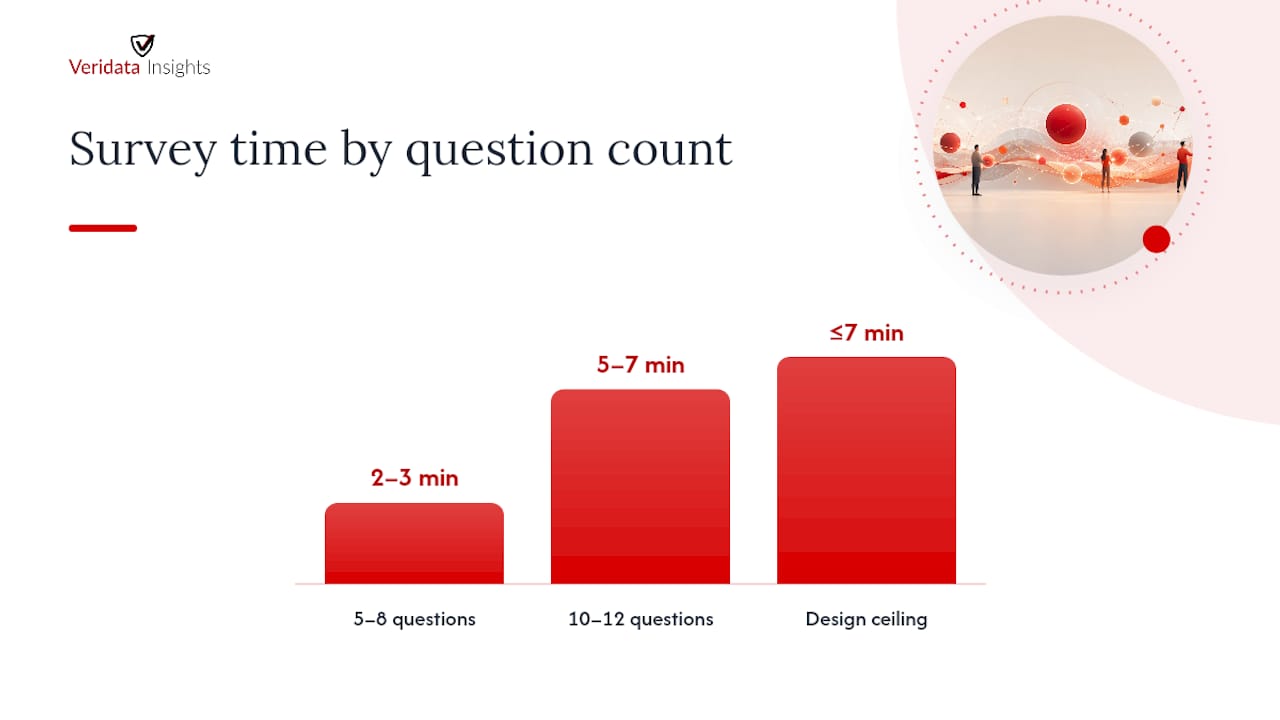
- Keep survey length under 10 to 12 questions or approximately seven minutes to maximize response and avoid fatigue.
- Personalizing invites based on recipient segments and offering multiple contact modes can improve engagement in hard-to-reach groups.
- Ensuring proper email deliverability with authentication, avoiding spam triggers, and respecting opt-out requests are essential for maintaining response quality.
Table of Contents
- How Do You Compose an Effective Email Survey Invite?
- What Makes a Survey Subject Line Get Opened?
- What Should the Body Copy of a Survey Email Say?
- When Is the Best Time to Send a Survey Invite?
- How Do You Send and Track Survey Emails Correctly?
- How Should You Segment and Personalize Survey Invites?
- Which Email Survey Templates Actually Work?
- What Evidence Backs These Recommendations?
- What Do GDPR and CAN-SPAM Require for Survey Emails?
- Get Professional Support for Complex Survey Programs
- Where This Guidance Comes From
- Sources
- FAQ
How Do You Compose an Effective Email Survey Invite?
Every part of a survey invitation does a job, and most researchers only think about one or two of them. The from name and subject line get you the open. The body gets you the click. The closing line gets you the honest answer instead of a rushed one. Skip a piece and the whole chain breaks, no matter how good your questionnaire is.
What recipients see before they even open the email
The from name and address matter more than most researchers give them credit for. “Sarah at Acme Research” outperforms a generic “noreply@surveyplatform.com” because it looks like a person, not a robot. If your organization has any name recognition with the recipient, use it. If not, pair a real person’s name with the organization (“Sarah, Acme Client Insights”) so the email reads as a relationship, not a broadcast.
Preview text (the snippet that shows next to or under the subject line) is prime real estate that gets ignored constantly. Don’t let your email platform auto-fill it with “View this email in your browser.” Write it yourself, and use it to extend the subject line rather than repeat it.
Structuring the body
The body of a good survey invite follows a tight structure:
- One sentence of context: why you specifically, why now
- One sentence stating the time estimate, stated honestly
- One clear call to action, not buried in a paragraph
- A short line on privacy or confidentiality
- A thank-you, even before they’ve responded
That’s it. Researchers tend to over-explain the study’s purpose or methodology, and every extra sentence is a chance for the reader to lose interest and close the tab.
The call to action
A button reads better than a plain text link on mobile, where most emails get opened first. Make the button text specific (“Start the 5-Minute Survey” beats “Click Here”) and make sure it’s accessible: sufficient color contrast, alt text for the button image, and a plain-text link as a fallback for recipients whose email client blocks images. If you’re building surveys for distribution on phones, review mobile survey questionnaire design guidance before you finalize the layout, since a button that looks fine on desktop can vanish on a small screen.
Pro Tip: Send yourself a test email and open it on your phone before it goes to a single recipient. If you have to pinch and zoom to find the button, so will everyone else.
What Makes a Survey Subject Line Get Opened?
Respondents consistently prefer subject lines that are informative and reference the purpose and sponsor of the study over ones that are vague or trying too hard to be clever, according to research published in Social Science Computer Review. Curiosity-driven subject lines might get a stray open out of confusion, but they don’t build the trust that gets someone to actually finish a survey.
Three frameworks consistently outperform generic ones:
- Question-based: “How was your recent support experience?”
- Benefit-driven: “Help us fix the checkout process (2 minutes)”
- Direct request: “Acme Corp wants your feedback on your April order”
Keep subject lines under 50 characters where possible. Most mobile inboxes truncate around 30 to 40 characters, so front-load the important word. “Acme wants your feedback” beats “We would really appreciate hearing your thoughts about your recent experience,” which gets cut off after “We would really.”
Related findings in SAGE Journals back this up: subject lines that name the interaction directly and promise a short time commitment beat vague or mysterious ones almost every time.
A subject line pattern respondents reward:
Naming both the sponsor and the specific interaction, while stating a realistic time commitment, is the single most reliable lever for improving open rates on survey invitations.
Preheader text should complete the thought, not restate it. And run your subject line through a basic spam-trigger check before sending: avoid all caps, multiple exclamation points, words like “free” or “winner,” and excessive punctuation. Spam filters flag these patterns automatically, and an invite that never lands in the inbox gets a response rate of exactly zero.
What Should the Body Copy of a Survey Email Say?
The body copy that converts after the open follows a five-part formula almost every time:
- Greeting — Use a name if you have one. “Hi Jordan” beats “Dear Customer.”
- Purpose — One sentence on why this survey, why this person. “You purchased from us last month, and we’d like to know how it went.”
- Time estimate — State it plainly and make it accurate: “This will take about 4 minutes.”
- Call to action — One button, one link, one action. Never two competing CTAs.
- Thank-you — Close with genuine appreciation, not corporate boilerplate.
Time estimates need to match reality. A good rule of thumb ties your estimate to question count: short pulse surveys with 5 to 8 simple questions run about 2 to 3 minutes; anything approaching 10 to 12 questions should be labeled at 5 to 7 minutes. Keeping the whole survey under roughly seven minutes or 10 to 12 questions is a widely cited benchmark for maximizing completion on email-distributed surveys, and it’s a good ceiling to design against rather than a target to hit.
If you’re offering an incentive, state it plainly and early, not buried at the bottom. “Complete this 4-minute survey and enter to win a $50 gift card” is honest and specific. Vague incentive language (“you could win a prize”) reads as a low-effort sweepstakes and actually depresses trust rather than building it.
A privacy line matters more than researchers assume. A single sentence like “Your responses are confidential and will only be used in aggregate” measurably reduces drop-off, especially on sensitive topics like compensation, health, or workplace culture. Respondents who don’t know where their answers are going tend to either abandon the survey or answer dishonestly, and neither helps your data. For question phrasing that keeps completion high once people are in the survey itself, the survey question examples library is worth a look before you finalize your instrument.
When Is the Best Time to Send a Survey Invite?
Send day matters more than most researchers assume. Email invitations sent on Mondays receive roughly 10% more responses than average, while Friday sends see about 13% fewer responses, according to Listen4Good’s best-practices research on survey administration. Reminders perform best when sent 48 to 72 hours after the initial invite, not sooner and not much later.
That gives you a simple, defensible cadence:
- Optional pre-notification — a short heads-up a day or two before the survey goes out, useful for higher-stakes B2B or client research
- Initial invite — Monday or Tuesday morning tends to outperform other days
- Reminder — 48 to 72 hours after the initial send, with a different subject line angle than the original
- Final reminder (if the survey window allows it) — closer to close date, framed around the deadline
Suppress anyone who already completed the survey before sending reminders. Nothing damages trust faster than thanking someone for feedback they already gave, then asking again three days later.
Pro Tip: Change the subject line for your reminder email. Reusing the same subject line makes it look like the same email they already ignored, and Gmail sometimes threads it invisibly under the original.
If you’re running a national or global sample, account for recipient time zones rather than your own. A Monday 9 AM send from your office might land at 2 AM for a segment of your list. A single-variable A/B test, comparing one send time or one subject line against another, is a fast way to learn what your specific audience responds to without overcomplicating the analysis.
How Do You Send and Track Survey Emails Correctly?
Most survey platforms, including Microsoft Dynamics 365 Customer Voice, let you insert survey links, personalize fields with variables, embed the first question directly in the email body, and choose templates before scheduling a send. These features are useful, but test whether embedding the first question actually increases completion for your specific audience. It helps in some contexts and adds friction in others.
Before any real send, run a test send to yourself and a colleague on different email clients (Gmail, Outlook, Apple Mail) and different devices. Broken links and mangled formatting are far more common than researchers expect, and they’re invisible until someone else opens the email on a client you didn’t check.
Decide upfront whether links are tracked or anonymous. Tracked links let you match responses to respondent records for follow-up, weighting, or panel management, which matters for longitudinal or B2B research. Anonymous links protect respondent identity for sensitive topics and often increase honesty on questions about satisfaction with a specific person or team.
A few operational habits that separate clean campaigns from messy ones:
- Import contact lists directly from your CRM rather than manually pasting addresses, which introduces typos and duplicates
- Honor opt-out and unsubscribe requests immediately and permanently, not just for the current campaign
- Set up SPF and DKIM authentication on your sending domain so major inboxes don’t flag your survey as spam
- Watch sender reputation over time. A domain that gets marked as spam once can face inbox placement problems for months
- Avoid spam-trigger words and excessive formatting in both subject line and body copy
Deliverability problems are often invisible until you check your open rates against industry norms and see them mysteriously low. If your open rate suddenly drops, check your sender reputation before you blame the subject line.
How Should You Segment and Personalize Survey Invites?
A generic invite blasted to your entire database wastes the relevance that segmentation buys you almost for free. Recent buyers, long-time customers, trial users who never converted, and churned accounts all have different relationships to your brand, and a single invite trying to speak to all of them speaks to none of them well. Segmenting by these behavioral categories consistently improves response rates compared to one-size-fits-all sends.
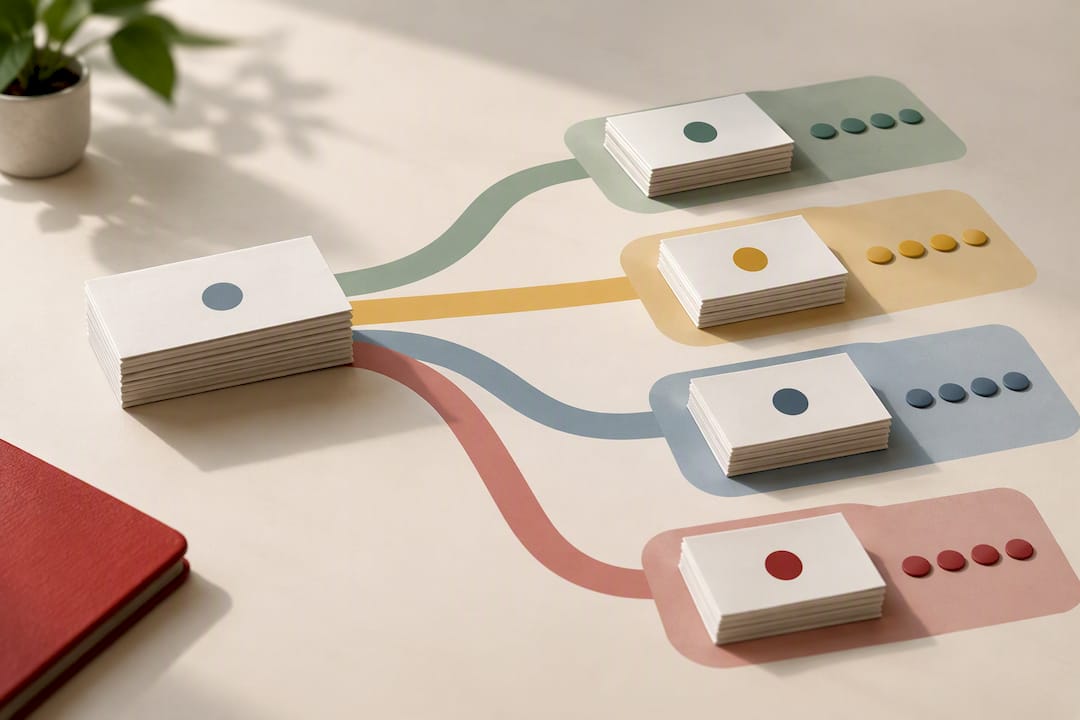
Personalization that actually helps looks less like inserting a first-name token and more like writing a context-specific opening sentence. “You canceled your subscription last month, and we’d like to understand why” does more work than “Hi {FirstName}, we value your feedback.” The first sentence proves you know who they are. The second is a mail-merge with a first name bolted on.
Useful segmentation angles for most research programs:
- Recent purchasers vs. long-tenured customers
- Active users vs. trial users who never converted
- Churned or canceled accounts
- Demographic or firmographic splits relevant to your study (industry, company size, geography)
For hard-to-reach segments, particularly in B2B or healthcare research where inboxes get gatekept by assistants or filtered by IT departments, email alone often underperforms. Combining email with phone or SMS follow-up, a multimode approach, reduces the nonresponse bias that comes from relying on a single channel. Reviewing B2B survey design tips before you build your segmentation plan will help you avoid designing a beautiful email for an audience that never checks that inbox.
Which Email Survey Templates Actually Work?
Below are six templates built around the structure covered above. Adapt the bracketed fields, but keep the sentence order.
- Transactional customer feedback
Subject: “How was your order from [Company]?” | Preheader: “Takes about 2 minutes.”
Body: “Hi [Name], you recently ordered [Product]. We’d love to know how it went. This survey takes about 2 minutes, and your answers are confidential. [Start Survey]. Thanks for helping us improve.”
Expected time: 2 minutes. - B2B client feedback
Subject: “[Company] would value your feedback on our partnership”
Body: “Hi [Name], as we wrap up Q[X], we’d like your honest read on how [Company] is doing as a partner. This survey takes about 5 minutes and your responses go directly to our leadership team. [Start Survey]. We appreciate your time.”
Expected time: 5 minutes. - Event follow-up
Subject: “Your thoughts on [Event Name]?” | Preheader: “3 quick questions.”
Body: “Hi [Name], thanks for joining [Event Name]. We’d love a few minutes of feedback while it’s fresh. [Start Survey]. See you at the next one.”
Expected time: 2 to 3 minutes. - Short pulse survey
Subject: “One quick question for you”
Body: “Hi [Name], quick one: how likely are you to recommend [Company] to a friend? [Start Survey]. That’s it. Thank you.”
Expected time: under 1 minute. - Reminder email
Subject: “Last chance: share your feedback on [Topic]”
Body: “Hi [Name], we sent a short survey a few days ago and wanted to follow up. It still takes about 4 minutes, and it closes [Date]. [Start Survey]. Thanks again.”
Expected time: matches original invite. - Incentivized consumer survey
Subject: “Answer 6 questions, enter to win $50”
Body: “Hi [Name], we’re running a short survey about [Topic]. It takes about 4 minutes, and everyone who completes it is entered to win a $50 gift card. [Start Survey]. Thanks for your time.”
Expected time: 4 minutes.
For multilingual audiences, don’t just translate the template word for word. Time estimates, incentive framing, and even directness levels in the CTA read differently across cultures, so have a native speaker review tone, not just grammar. If you’re distributing the same instrument across markets, translations and localizations support built for research (not general marketing translation) catches nuances a generic translation service misses. For more full-length examples organized by use case, the client survey guide and sample survey templates library both go deeper than the six above.
What Evidence Backs These Recommendations?
None of this is guesswork. The timing guidance comes from Listen4Good’s analysis of email survey administration, which found the Monday send advantage and the 48 to 72 hour reminder window. The subject-line guidance traces back to peer-reviewed research in Social Science Computer Review, which found respondents cooperate more with informative, sponsor-referenced subject lines than clever or vague ones.
At Veridata Insights, we build these findings into every fielding plan we design, because a well-worded invite that goes out on the wrong day still underperforms. We know the difference between a survey that gets ignored and one that gets answered honestly, and it usually comes down to details this small.
Run it yourself when:
- Your list is small, your audience is easy to reach, and you have in-house email infrastructure
Bring in a research partner when:
- You need hard-to-reach or specialized recruitment (healthcare providers, niche B2B roles, low-incidence consumer segments)
- The project needs multilingual fielding, complex sampling, or defensible methodology for a client-facing report
What Do GDPR and CAN-SPAM Require for Survey Emails?
If any recipient is in the European Union or European Economic Area, GDPR requires a lawful basis for emailing them, typically consent or legitimate interest, along with a clear explanation of how their data will be used and stored. Your survey invite should state this plainly, and your privacy policy needs to be one click away, not buried three pages deep in your site navigation.
In the United States, CAN-SPAM governs commercial email, and while research invitations sit in a gray area depending on framing, the safest practice is to follow its rules anyway: use an accurate from name and subject line, include a physical mailing address, and provide a working unsubscribe mechanism that processes requests within 10 business days. Never use a subject line that misrepresents the email’s content just to boost opens. It violates CAN-SPAM outright and it erodes the trust your response rate depends on.
Beyond the legal minimums, honor opt-outs immediately across every future campaign, not just the current one, and avoid over-surveying the same list. Sending too many invitations to the same contacts in a short window is one of the fastest ways to inflate unsubscribe rates and burn a list you’ll want to use again next quarter. If your organization runs research across multiple markets, a quick review of local data-protection rules for each one is worth the hour it takes, since requirements vary meaningfully outside the EU and US.
Get Professional Support for Complex Survey Programs
There’s a real ceiling on what one researcher with an email platform can pull off alone, and it shows up fastest on hard-to-reach audiences, multilingual fielding, and studies where a client or leadership team needs defensible methodology behind every number. That’s where Veridata Insights operates. They offer full-service market research without project minimums, with availability year-round, and have expertise in recruiting hard-to-reach audiences such as healthcare providers, niche B2B roles, and low-incidence consumer segments.
When a project outgrows what email alone can deliver, our respondent recruitment team builds sampling plans for exactly these audiences, and our full-service market research offering covers everything from questionnaire design through programming, translation, data processing, and reporting. If your study needs quantitative rigor at scale, our quantitative market research services handle programming and analysis end to end.
Reach out through our site to scope your project, no minimum size required, and tell us what you’re trying to learn. We’ll tell you honestly whether an email invite is enough or whether the audience calls for something more.
Where This Guidance Comes From
The timing and reminder recommendations throughout this guide trace back to Listen4Good’s best practices for email surveying, which analyzed send-day performance and reminder windows across real survey campaigns. The subject-line research comes from a peer-reviewed study in Social Science Computer Review, with additional confirming evidence published in SAGE Journals.
For response-rate definitions and broader survey methodology standards, AAPOR’s response-rate resources remain the field’s reference point. Operational guidance on sending, scheduling, and personalizing survey emails through a distribution platform is documented in Microsoft Dynamics 365 Customer Voice’s help content, and practical benchmarks on survey length and completion rates come from Testimonial.to’s survey email resources.
Sources
- What are best practices for surveying via email? — Listen4Good
- Which subject lines and messages improve response to e-mail invitations to web surveys? — Social Science Computer Review (ResearchGate)
- Send survey email — Microsoft Dynamics 365 Customer Voice
- Testimonial
FAQ
Can you provide some examples of survey emails?
Yes. A short pulse survey might read: “Hi Name], quick one: how likely are you to recommend us to a friend? [Start Survey]. Thanks.” A full example set covering transactional feedback, B2B client checks, and event follow-ups appears in the templates section above, and more are available in the [sample survey templates library.
How do I send a survey via email?
Import your contact list into your email or survey platform, personalize the subject line and greeting where possible, insert your survey link or embed the first question, and run a test send to yourself before scheduling. Most platforms, including Microsoft Dynamics 365 Customer Voice, support this workflow directly.
How do I invite people to take a survey?
Use a recognizable sender name, an informative subject line naming the purpose and sponsor, and a body that states why you’re asking, how long it takes, and includes one clear call to action. Send on a Monday or Tuesday when possible, since Monday sends see roughly 10% higher response than average.
What are 5 good survey questions examples?
Strong examples include a single-item satisfaction rating (“How satisfied were you with your recent experience?”), a Net Promoter Score question, an open-ended “What could we do better?”, a specific behavioral question tied to a recent interaction, and a demographic or firmographic classifier. The survey question examples library covers phrasing for each of these in more depth.
Does Veridata Insights help with email survey distribution?
Yes. Veridata Insights supports survey programming, respondent recruitment, and full-service research design for organizations that need managed distribution rather than a DIY email send. Pricing depends on project scope and is available by contacting the team directly through the full-service market research page.