


Quota management sets response limits by subgroup so your sample mirrors the population you actually care about. Use it whenever representativeness matters more than pure randomness, and take one action before you write a single question: design cells you can realistically fill and then screen for age, gender, region, or other quota attributes in the first few questions. Everything else, from handling rules to mid-field adjustments, follows from getting that first move right.
TL;DR:
- Quota management ensures subgroup sample proportions reflect the population, requiring careful cell design and early screening for attributes like age and region.
- Rely on terminate, redirect, or hide rules once quota cells are full, with redirect being more respondent-friendly and cost-effective for most commercial studies.
- Use independent quotas when analyzing variables separately, but opt for interlocked quotas only for specific interactions, as they multiply cell counts and complicate fieldwork.
- Set realistic targets based on benchmark proportions, add a 5-10% buffer for hard-to-fill cells, and verify feasibility against panel profiling data before fielding.
- Adjust or relax quotas mid-field when necessary, but always document changes transparently to maintain study credibility and support post-survey weighting if needed.
Table of Contents
- What Is Quota Management in Surveys?
- When Should You Use Quota Management?
- Independent vs. Interlocked Quotas: Which Do You Need?
- Designing Feasible Quota Targets Before Fieldwork Starts
- Implementing Quotas Without Wrecking the Respondent Experience
- Reading Quota Dashboards and Making Mid-Field Adjustments
- Troubleshooting: When Quotas Start Working Against You
- How Veridata Insights Handles Quota-Managed Fieldwork
- Get Hands-On Help With Your Next Quota-Managed Study
- Sources
- FAQ
What Is Quota Management in Surveys?
A quota is a target number of completed interviews for a specific subgroup, and a quota cell is the bucket that target lives in. If you need 200 women aged 35 to 44 in the Midwest, that combination is one cell. Most survey platforms track every cell in real time and stop accepting new respondents into it the moment it fills.
What happens next depends on how you’ve configured the platform. There are three standard behaviors when a respondent tries to enter a full cell, and SurveyGizmo’s quota documentation outlines all three clearly:
- Terminate: the respondent is screened out and the survey ends immediately, which is fast but can feel abrupt and hurts panel goodwill if it happens often.
- Redirect: the respondent is routed to another survey, a thank-you page, or an external link, preserving some value from the traffic instead of wasting it.
- Hide: the filled option disappears from future respondents’ screening questions entirely, so nobody even sees the choice that’s closed.
Picture a tracking study needing 150 completes from small-business owners in the retail sector. Once that cell hits 150, a terminate rule cuts off the 151st matching respondent cold. A redirect rule instead sends that same person to a different open study, which is friendlier and often cheaper per completed interview once you count wasted recruitment spend.
When Should You Use Quota Management?
Quotas earn their keep whenever you need a sample that reflects known population proportions but can’t or won’t draw a true random sample. Concept tests, brand tracking waves, subgroup comparisons, and most customer satisfaction studies fall into this category because the client cares about hitting specific audience segments more than about statistical purity.
Quotas are the wrong tool, though, when a study feeds a decision that requires known selection probabilities, such as policy research, government-adjacent studies, or anything that will be defended with confidence intervals in a regulatory setting. SAGE’s methods reference on quota sampling makes the distinction plain: quota sampling controls subgroup counts by design, but it doesn’t produce the known probabilities that stratified random sampling does, so it can’t support the same statistical claims.
Here’s a simple decision sequence to run before you commit to either approach:
- Ask what the data will be used for. If the answer involves regulatory filings, litigation, or population-level estimates with formal margins of error, lean toward probability sampling.
- Check whether subgroup representation is the priority. Concept testing, ad tracking, and most commercial research care more about hitting the right mix of people than about randomness.
- Weigh cost and timeline. Probability sampling from a general population frame is slower and pricier; quotas against a panel or database are faster and cheaper for most commercial timelines.
- Confirm you can report honestly. Quota samples require caveats about generalizability. If your client or stakeholder can’t accept that limitation, quotas aren’t the right fit.
Independent vs. Interlocked Quotas: Which Do You Need?
Independent quotas control one variable at a time. That means you could end up with 50 women all in the 18 to 24 band and very few in the 55-plus band, since the two quotas never talk to each other.
Interlocked quotas, sometimes called cross or nested quotas, fix that gap by combining two or more variables into a single cell. Cint’s developer documentation on interlocked quotas describes this as building a matrix where every combination becomes its own independent target, which gives far tighter control over intersectional representation.
That control comes at a price. Every added dimension multiplies your cell count, and rare combinations, like men aged 65-plus in a low-incidence region, can stall fieldwork for weeks if the panel doesn’t have enough of them.
Rules of thumb worth keeping on a sticky note:
- Use independent quotas when your analysis plan looks at variables separately (age reporting here, gender reporting there) rather than in combination.
- Use interlocked quotas only for the specific intersections your analysis actually needs, not every combination that seems interesting.
- Every added dimension roughly multiplies your total cell count, so a 3×4 age by region grid becomes a 3x4x2 grid the moment you add gender, and small cells get harder to fill fast.
- When budget or timeline is tight, interlock the two variables that matter most and leave the rest as independent quotas or post-survey weights.
Designing Feasible Quota Targets Before Fieldwork Starts
Start by mapping your research questions to quota dimensions, and resist the urge to quota on everything you could measure. If your analysis plan only ever compares results by age and region, don’t add income and employment status as quota cells too. Extra dimensions you don’t plan to analyze against just make fieldwork harder without adding insight.
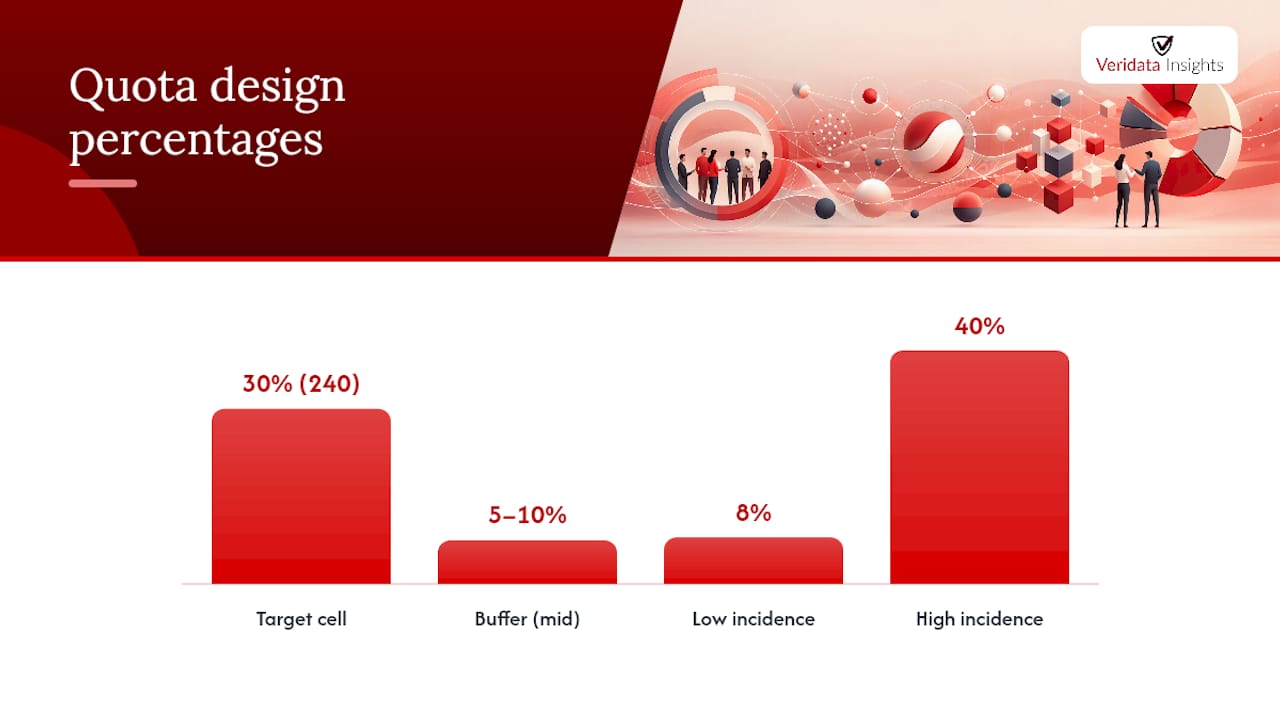
Pull your target proportions from a real benchmark. Census data, prior wave results from the same tracking study, or panel provider profiling data all work, and each has trade-offs: census figures are authoritative but can lag by years, while panel data reflects who’s actually available to survey right now. Convert those proportions into raw counts against your total sample size. A study of 800 completes targeting 30% aged 45 to 54 needs 240 respondents in that cell, not a vague “about a third.”
Build in a 5% to 10% buffer on cells you expect to be hard to fill, and think through incidence rate and cost-per-interview implications before you lock targets. A cell with 8% incidence in the general population costs far more per complete than one at 40% incidence, even if both need the same 100 completes.
- Map every quota dimension back to a specific line in your analysis plan.
- Pull benchmark proportions from census figures, past wave data, or panel profiling reports.
- Convert percentages into hard counts against total sample size, not rounded estimates.
- Add a 5% to 10% buffer on any cell you expect will run slow.
- Estimate incidence and cost-per-interview before finalizing targets, not after fieldwork stalls.
Pro Tip: Before locking your quota grid, run a quick feasibility check against your panel provider’s own profiling counts for the rarest cell. If they can’t show you at least a few hundred available profiles matching that intersection, plan for weighting instead of forcing the quota.
As a rough ceiling, most interlocked designs start breaking down once you’re combining more than two or three dimensions against a sample under a few thousand completes. Past that point, switch strategy: collect a broader independent sample and apply post-stratification weighting afterward rather than chasing an interlocked cell that simply doesn’t exist in sufficient numbers on your available panel.
Implementing Quotas Without Wrecking the Respondent Experience
Screening questions that determine quota eligibility belong in the first two or three questions of your survey, full stop. Every question you ask before screening someone out is time and goodwill wasted, both for the respondent and for your incidence rate math. Best practices in survey design consistently point to front-loading demographic and eligibility screens for exactly this reason.
Choosing between terminate, redirect, and hide isn’t just a technical setting, it’s a respondent-experience decision. Terminate fits short, low-stakes surveys where a clean cutoff won’t frustrate anyone. Redirect makes sense when you have another live study that can use the traffic, turning what would be a dead end into a second chance at a complete. Hide works best for longer surveys where you don’t want respondents investing five minutes only to discover their subgroup closed after the fact.
For surveys running 15 minutes or longer, build in a second quota check partway through. Fieldwork moves fast, and a cell that had open slots when a respondent started can fill before they finish. QuestionPro’s advanced quota control documentation describes exactly this kind of second check as standard practice for longer instruments, alongside minimum quota floors that guarantee a baseline count in cells that tend to lag.
- Place quota-relevant screening questions in the first two or three questions, never buried mid-survey.
- Match your handling rule to survey length and stakes: terminate for short surveys, redirect when you have a live alternate study, hide for longer surveys.
- Add a second quota check for any survey running past 15 minutes to catch late collisions.
- Set minimum quota floors on cells you know are historically slow to fill.
Configuring that second checkpoint costs a few minutes of setup and often saves a full day of chasing a stalled cell.
Reading Quota Dashboards and Making Mid-Field Adjustments
A live dashboard shows fill rate per cell, remaining slots, and pacing against your fielding timeline, and reading it well is mostly about spotting the gap between expected and actual pace early.
Practical fixes for a lagging cell include extending the fieldwork window, layering in a recruitment source that over-indexes for that specific group, nudging incentives upward for just that segment, or, as a last resort, relaxing the quota slightly and compensating with weighting afterward. Recruiting hard-to-reach audiences often comes down to exactly this kind of targeted source-mixing rather than brute-forcing the original plan.
Whatever you change, document it. If you raise a quota target, swap a recruitment source, or relax a cell mid-field, that decision belongs in your methodology notes and, ideally, in the final report’s limitations section. The GSS quota sampling guidance from the UK government statistics service is blunt about this: quota samples already can’t claim known selection probabilities, so undocumented mid-field changes make the limitations worse, not better.
- Compare actual fill rate against your planned pacing curve daily during early fieldwork, not just at the end.
- Extend timelines, add recruitment sources, or raise incentives before you touch the quota target itself.
- Log every quota change with the date, reason, and who approved it.
- Apply post-stratification weighting when a cell finishes short, and disclose the weighting approach in your deliverable.
Pro Tip: Keep a running change log from day one of fieldwork, even for small tweaks. A methodology reviewer six months later will thank you, and so will you when a client asks why the regional split shifted between waves.
Weighting can rescue a study with a mildly underfilled cell, but it has real limits. Heavy weights on very small cells inflate variance and can make your topline numbers less stable, not more accurate, so treat weighting as a correction for modest gaps, not a substitute for a workable quota design.
Troubleshooting: When Quotas Start Working Against You
Watch for three warning signs that your quota design has outrun your panel’s capacity. Sessions terminating at unusually high rates, a cost-per-interview that keeps climbing past your original estimate, and a quota grid with more interlocked cells than your sample size can reasonably support are all symptoms of the same underlying problem: the design asked for more precision than the field can deliver.
- Relax a noncritical dimension first. If gender by age by region by income is stalling, drop income back to an independent quota or a post-survey weight rather than an interlocked cell.
- Retarget recruitment toward the specific lagging segment instead of just running more general traffic and hoping some of it matches.
- Re-check screener order and wording. A confusing or overly long screener before the quota question can inflate terminations that have nothing to do with the quota itself.
- Report the fix honestly. If you relaxed a cell or extended field time, say so in the limitations section rather than presenting the final numbers as if the original plan went off without a hitch.
Transparency here isn’t just good practice, it protects the credibility of the whole study. A client who finds out later that a quota was quietly loosened without disclosure will trust your next report a lot less.
How Veridata Insights Handles Quota-Managed Fieldwork
We follow the same rules we just walked you through, every time. Screen for quota attributes early, build feasibility checks against real panel counts before locking targets, add buffers on the cells we know will run slow, and document every mid-field adjustment so it shows up in the final report, not as a surprise.
Our team supports quota-managed studies end to end: recruitment for hard-to-reach and interlocked segments, survey programming that gets handling rules and second quota checks configured correctly the first time, and weighting support when a cell finishes short. Whether it’s B2B, B2C, healthcare, or general population work, the goal is the same: a quota design that’s ambitious enough to answer your research question and realistic enough to actually finish on schedule.
Get Hands-On Help With Your Next Quota-Managed Study
You’ve now got the playbook: feasible cells, early screeners, live dashboards, and honest documentation when things shift mid-field. The gap between knowing this and executing it under a real deadline is where most quota designs actually break down, usually because a small internal team is juggling programming, recruitment, and monitoring all at once with no slack in the schedule.
Quota-managed fieldwork is best run as a full-service operation with flexible availability to ensure timely monitoring of lagging cells. That covers respondent recruitment for hard-to-reach and interlocked segments, survey programming with handling rules and second quota checks built in correctly the first time, and weighting support when a cell finishes short despite everyone’s best effort. If your quota design needs an extra set of hands, or a full team running the whole study, start with a look at full-service market research and tell us what your quota grid needs to hit.
Sources
For deeper methodology, see the GSS quota sampling guidance and SAGE’s quota sampling reference.
- SurveyGizmo help: Survey quotas
- SAGE Methods: Quota sampling
- Cint developer: Interlocked quotas concept
- QuestionPro: Advanced quota control
FAQ
Should I Enable Quota Management on My Survey?
Enable it whenever your study needs a sample that mirrors specific population proportions, such as age, gender, or region, rather than a pure random draw. Skip it for studies feeding decisions that require known selection probabilities, where probability sampling is the more defensible choice.
What Exactly Is a Quota in Survey Research?
A quota is a target completion count for a specific subgroup, such as a defined age range. The platform tracks that count in real time and applies a handling rule, terminate, redirect, or hide, once the cell fills, as described in SurveyGizmo’s quota documentation.
What Is an Example of Quota Sampling?
Interviewers or online screeners then fill each bucket until it hits target, stopping new entries once a cell closes.
How Do You Calculate Quota Sampling Targets?
Start with a benchmark proportion, from census data, panel profiling, or a prior study wave, and multiply it by your total planned sample size.