

TL;DR:
- A data collection workflow is a structured process that ensures accurate, organized data collection for analysis. Proper design, validation, and automation reduce errors, delays, and scope creep, improving project efficiency. Regular reviews and outsourcing routine tasks help maintain high data quality over time.
A data collection workflow is the structured sequence of steps, tools, and validation rules that move raw data from source to analysis-ready output. When this sequence is well-designed, accuracy goes up, project delays go down, and your team spends more time on strategy instead of fixing errors. For business professionals and researchers, getting this right is not optional. It is the foundation of every credible finding you deliver. Tools like AI-driven automation, CRM integration, and validated intake questionnaires are now central to how modern workflows operate, and this guide covers all of it.
What is a data collection workflow, and what does it require?
A data collection workflow is the end-to-end process of defining what data you need, gathering it through the right methods, validating it for accuracy, and organizing it for analysis. The industry also refers to this as a data gathering process or data management pipeline, depending on the context. Both terms describe the same core discipline.
Before you collect a single data point, you need three things in place:
- Clear research objectives. Every data point you collect should map to a specific question your project needs to answer. Vague objectives produce vague data.
- A method selection decision. Primary data collection methods include surveys, interviews, and direct observation. Secondary methods include existing databases, published reports, and CRM exports. The right choice depends on your timeline, budget, and the type of insight you need.
- Data quality standards. Define validation rules, required fields, and compliance requirements before you build anything. For regulated industries, this means accounting for GDPR, HIPAA, or sector-specific audit requirements from day one.
The tools you select should match your method. Electronic Data Capture (EDC) systems work well for clinical and structured research. AI automation software handles high-volume, repetitive intake tasks. CRM platforms like Salesforce or HubSpot manage client-facing data flows in consulting contexts.
| Workflow Component | Purpose | Example Tools |
|---|---|---|
| Objective mapping | Defines what data to collect and why | Project brief, research plan |
| Data collection method | Determines how data is gathered | Surveys, EDC systems, CRM exports |
| Validation rules | Catches errors before they enter the system | Predefined dropdowns, mandatory fields |
| Compliance framework | Meets regulatory requirements | GDPR, HIPAA, audit trail software |

Pro Tip: Run a one-page discovery audit before selecting any tool. List every data point your project requires, where it currently lives, and who owns it. This single step prevents tool mismatches and scope creep later.
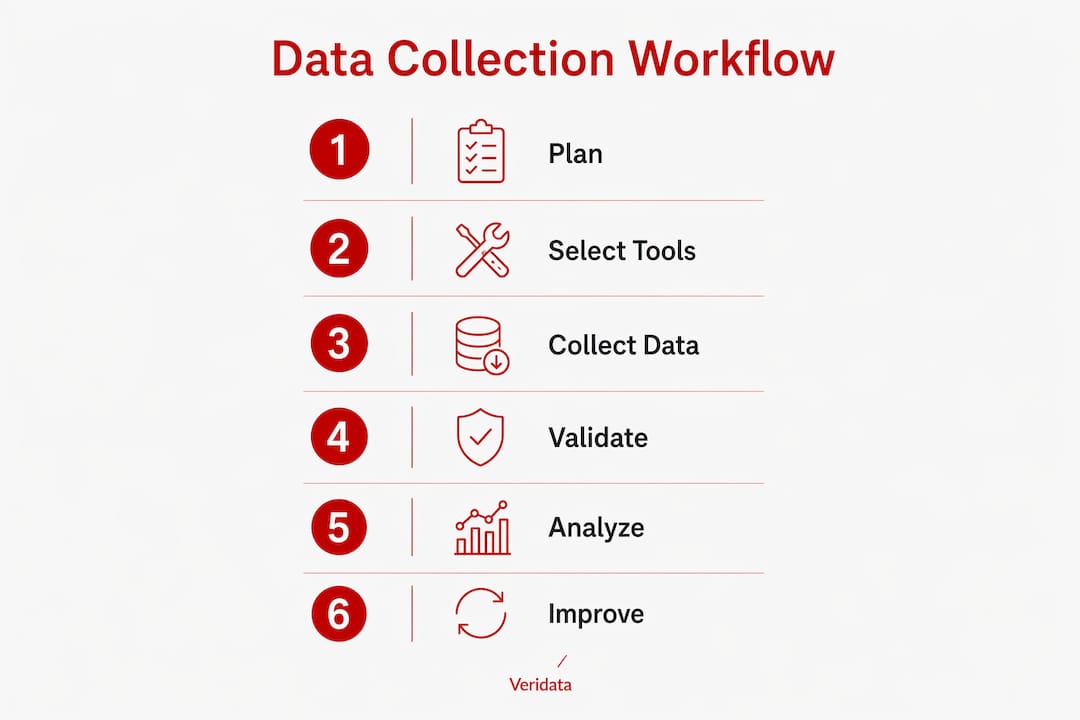
How do you design an automated data collection workflow?
Designing an automated data gathering process starts with documentation, not technology. A discovery audit that maps every data point and document step is the required first move before any automation is configured. This audit becomes your blueprint. Without it, automation amplifies existing problems instead of solving them.
Here is a practical sequence for building and implementing your workflow:
- Conduct the discovery audit. Document every data point from first client contact to project kickoff. Note the format, source system, and responsible team member for each item.
- Configure automation triggers. Set up AI agents or workflow automation tools to fire when specific conditions are met, such as a form submission, a contract signature, or a CRM record update.
- Integrate source and destination systems. Connect your intake forms, CRM, ERP, or database so data flows without manual copying. Tools like Zapier, Make (formerly Integromat), or native API connections handle most of these integrations.
- Build your client intake questionnaire. A structured intake questionnaire sent after contract signing is one of the most effective tools for preventing scope creep in consulting projects. A 40-question template covers the full scope of a project without overwhelming the client.
- Automate document generation and data entry. Once intake data is captured, automation tools can pre-populate project briefs, generate contracts, and push records into your CRM or project management system.
The payoff is significant. AI-powered client intake can reduce onboarding delays from 24 hours to under 5 minutes, with individual data entry tasks completing in under two minutes. That is not a marginal improvement. It is a structural change in how your team operates.
Pro Tip: For consulting projects, send your intake questionnaire after the contract is signed but before the kickoff call. Clients are more engaged at this stage, and their answers give you the context you need to run a focused, productive first meeting.
For teams working in research and consulting contexts, Veridata Insights has documented how AI in market research changes the speed and reliability of data workflows at scale.
What are best practices for data accuracy and compliance?
Accuracy in a data collection workflow does not happen by accident. It is the result of deliberate design choices made before data entry begins.
The most effective accuracy practices include:
- Mandatory field validation. Require specific fields to be completed before a form can be submitted. Use predefined dropdowns, date pickers, and numeric range limits to prevent free-text errors. Standard validation protocols like these are the baseline for reproducibility and compliance in medical and research studies.
- Confidence thresholds for AI review. AI data entry systems should not attempt to process every record autonomously. Setting confidence thresholds routes uncertain or out-of-range data to a human reviewer before it enters the system. This keeps overall integrity intact without slowing down the majority of clean records.
- Scheduled accuracy reviews. Consulting data entry workflows that target 99% or higher accuracy use weekly reviews during the first month, then shift to monthly reviews once the workflow stabilizes. This cadence catches systematic errors early.
- Standardized entry protocols. Every team member who touches data should follow the same naming conventions, date formats, and field definitions. Document these in a one-page style guide and revisit it when onboarding new staff.
- Compliance documentation. For projects subject to GDPR or HIPAA, build audit trails into your workflow from the start. Log who accessed what data, when, and what changes were made.
“Medical research experts prioritize standardized input controls and validation to ensure data consistency and regulatory compliance.” — Simbi Labs
This principle applies equally outside healthcare. Any research project that will be audited, published, or used to drive significant business decisions needs the same discipline. Veridata Insights covers this in detail in its pharmaceutical research checklist, which outlines the validation steps that protect data integrity across regulated workflows.
How do you fix and improve a workflow over time?
Even a well-designed data collection workflow develops problems. The most common ones are scope creep, inconsistent data formats, and manual errors that compound over time.
Here is how to address each systematically:
- Tackle scope creep with structured intake forms. Marking only 15–20 questions as required in a client intake form balances completeness with client ease. Optional questions capture additional context without creating friction or confusion about what is truly needed.
- Monitor exception volumes. Track how often your AI or automated system flags records for human review. A rising exception rate signals that your validation rules or source data formats have drifted and need recalibration.
- Review performance metrics on a set schedule. Monthly workflow audits should cover error rates, processing times, and data completeness scores. Treat these like financial reviews. They tell you where the workflow is healthy and where it is not.
- Iterate based on feedback. Collect input from the team members who use the workflow daily. They spot friction points that dashboards miss.
- Outsource routine data tasks when workloads spike. Data collection and cleansing is the most time-consuming phase for consultants, and it is the first to degrade under heavy workloads. Outsourcing these tasks to a specialist frees your team to focus on analysis and client strategy.
Pro Tip: Build a simple exception log in your project management tool. Every time a record gets flagged for manual review, log the reason. After 30 days, you will have a clear picture of your most common data quality issues and can fix them at the source.
The data analysis workflow improvements that deliver the best ROI are almost always the ones that address the most frequent failure points first, not the most sophisticated ones.
Key takeaways
A well-structured data collection workflow requires clear objectives, validated intake processes, and scheduled accuracy reviews to deliver reliable, analysis-ready data.
| Point | Details |
|---|---|
| Start with a discovery audit | Map every data point and source before selecting tools or configuring automation. |
| Automate intake to cut delays | AI-powered intake reduces onboarding from 24 hours to under 5 minutes. |
| Use confidence thresholds | Route uncertain AI-processed records to human reviewers to protect data integrity. |
| Schedule accuracy reviews | Weekly reviews in month one, then monthly, target 99% or higher accuracy rates. |
| Outsource routine data tasks | Delegating collection and cleansing keeps your team focused on strategy and analysis. |
What i have learned from watching workflows succeed and fail
After working across dozens of research and consulting projects, the pattern I keep seeing is this: teams invest heavily in analysis tools and almost nothing in the intake process that feeds them. The result is sophisticated software running on inconsistent, incomplete data.
The discovery audit step is where most projects either set themselves up or set themselves back. I have watched teams skip it because it feels administrative, then spend weeks untangling data format conflicts that a two-hour audit would have prevented. The audit is not overhead. It is the project.
I am also skeptical of full automation as a goal. The best workflows I have seen treat automation as a filter, not a replacement. They automate the clean, predictable records and route the exceptions to people who can make judgment calls. That balance is what gets you to 99% accuracy without burning out your reviewers.
The other thing worth saying plainly: scope creep in data collection is almost always a communication failure, not a technical one. A structured intake questionnaire does not just capture information. It forces a conversation about what the project actually needs before anyone starts collecting anything. That conversation is worth more than any tool you can buy.
— Daniel
How veridata insights supports your data workflow
Veridata Insights works with business professionals and researchers who need their data collection done right, whether that means full-service support or targeted help with one phase of the process. From questionnaire design and methodology selection to programming, data collection, and reporting, the team at Veridata Insights handles as much or as little as your project requires, with no minimums and availability seven days a week. If your workflow needs a stronger foundation or you want expert eyes on your current process, reach out to Veridata Insights to talk through your project. See how consulting firms get results with the right research partner behind them.
FAQ
What is a data collection workflow?
A data collection workflow is the structured sequence of steps used to gather, validate, and organize data for analysis. It includes method selection, tool configuration, validation rules, and quality review processes.
How does automation improve a data collection workflow?
Automation reduces manual entry time and onboarding delays significantly. AI-powered intake systems can complete tasks in under two minutes and cut onboarding from 24 hours to under 5 minutes.
What are the most common data collection workflow problems?
Scope creep, inconsistent data formats, and manual entry errors are the most frequent issues. Structured intake forms, validation rules, and regular exception monitoring address all three.
How do you maintain data accuracy in a workflow?
Target 99% or higher accuracy by using mandatory field validation, setting AI confidence thresholds to route uncertain records to human reviewers, and scheduling weekly accuracy reviews during the first month of operation.
When should a business outsource data collection tasks?
Outsource routine collection and cleansing tasks when project workloads spike or when manual data handling is pulling your team away from analysis and strategy. This is the phase most likely to degrade first under pressure.